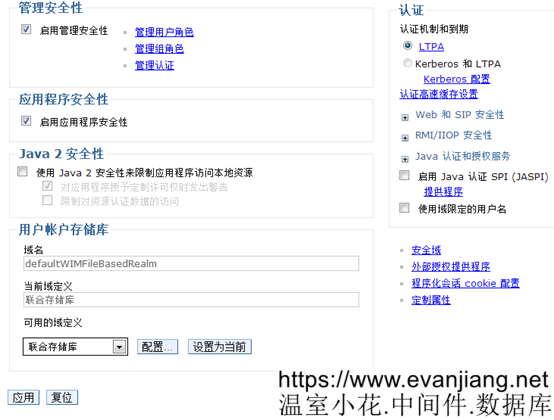
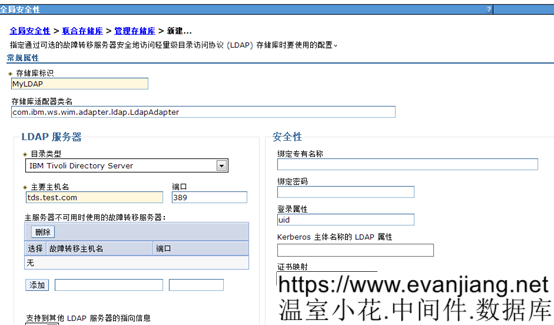
如果门户已经进行安全性迁移那么还需进行下图的操作使DM与Portal使用同一个LDAP存储库
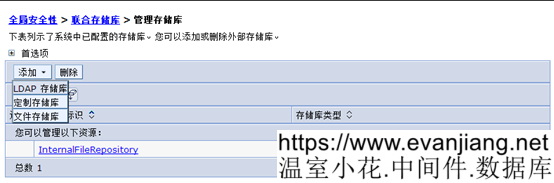
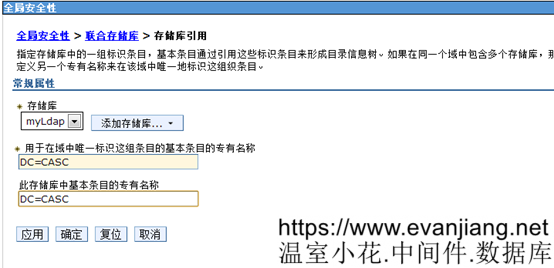
重启DM
将portal1加到新节点
cd /opt/IBM/WebSphere/wp_profile/bin
./addNode.sh portal8.test.com 8879 -username wpsadmin -password password –includeapps
重启DM
/opt/IBM/WebSphere/wp_profile/ConfigEngine/properties目录下的wkplc.properties,修改如下属性
|
WasPassword |
password |
|
PortalAdminPwd |
password |
|
WasRemoteHostName |
portal8.test.com |
|
WasSoapPort |
8879 |
|
PrimaryNode |
true |
执行下面的命令
./ConfigEngine.sh cluster-node-config-post-federation -DWasPassword=password
./ConfigEngine.sh cluster-node-config-cluster-setup -DWasPassword=password
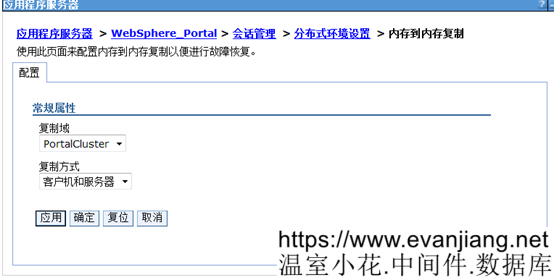
Portal1加入集群成功
配置副节点portal2
将主节点中的
<PortalServer root>/profileTemplates/profileTemplates.zip
注释:profileTemplates.zip不能复制到指定目录,因为指定目录没有写的权限,用
Chmod u+w –R /opt/IBM/WebSphere/PortalServer/profileTemplates 对目录授予写的权限
复制到副节点的
<PortalServer root>/profileTemplates
执行下面命令
cd /opt/IBM/WebSphere/PortalServer/profileTemplates
unzip profileTemplates.zip
./installPortalTemplates.sh /opt/IBM/WebSphere/AppServer
cd /opt/IBM/WebSphere/AppServer/bin/
./manageprofiles.sh -create -templatePath /opt/IBM/WebSphere/PortalServer/profileTemplates/managed.portal -profileName wp_profile -profilePath /opt/IBM/WebSphere/wp_profile -cellName portal8TwoCell -nodeName portal8TwoNode -hostName portal8two.test.com
修改/opt/IBM/WebSphere/PortalServer/wps.properties
在后面增加下面属性:
ProfileName=wp_profile
ProfileDirectory=/opt/IBM/WebSphere/wp_profile
cd /opt/IBM/WebSphere/wp_profile/bin
将ojdbc6.jar 放到./opt/IBM/WebSphere/wp_profile/jbdc/oracle下
./addNode.sh portal8.test.com 8879 -username wpsadmin -password password
修改/opt/IBM/WebSphere/wp_profile/ConfigEngine/properties/wkplc.properties
|
WasPassword |
password |
|
PortalAdminPwd |
password |
|
WasRemoteHostName |
portal8.test.com |
|
WasSoapPort |
8879 |
|
PrimaryNode |
false |
./startNode.sh
cd /opt/IBM/WebSphere/wp_profile/ConfigEngine
./ConfigEngine.sh cluster-node-config-cluster-setup-additional -DWasPassword=password
修改/opt/IBM/WebSphere/wp_profile/ConfigEngine/properties/wkplc.properties
PortalAdminId=<your Full DN LDAP ID>
PortalAdminGroupId=<your Full DN LDAP ID>
./ConfigEngine.sh update-jcr-admin -DWasPassword=password
以下文章点击率最高
Loading…