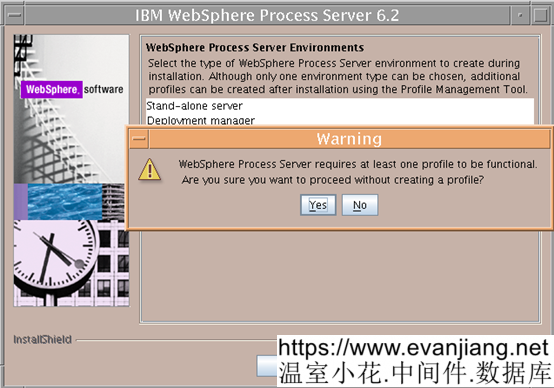
安裝IHS和Plugin V6.1
安裝UpdateInstaller7.0.0.7(最新版本)
安裝IHS/Plugin/WPS的補丁
分別對IHS,Plugin和WPS進行補丁(其中WPS的補丁需要運行兩遍)
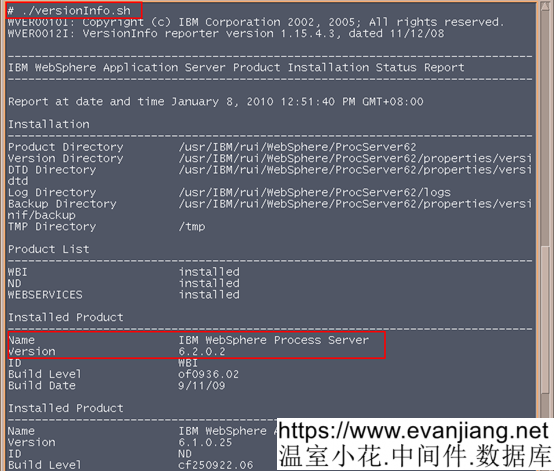
WPS打完補丁,在<WPS_HOME>/bin下執行versionInfo.sh查看版本,WPS應該為V6.2.0.2:
配置WPS
創建DM Profiles
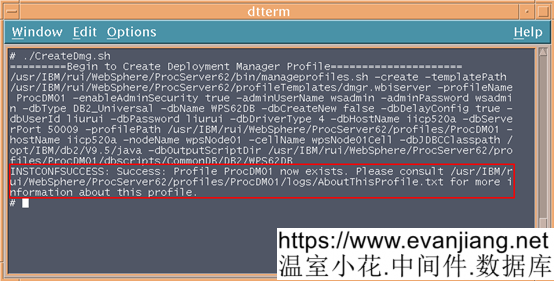
執行命令,創建DMprofile,命令參見CreateDmg.sh
#!/bin/sh
WPS_HOME=/washome/IBM/WebSphere/ProcServer
DB_DRIVER=/washome/IBM/DB2JAVA
echo =========Begin to Create Deployment Manager Profile=====================
echo $WPS_HOME/bin/manageprofiles.sh -create \
-templatePath $WPS_HOME/profileTemplates/dmgr.wbiserver \
-profileName ProcDM01 \
-enableAdminSecurity true \
-adminUserName wsadmin \
-adminPassword wsadmin \
-dbType DB2_Universal \
-dbName WPS62DB \
-dbCreateNew false \
-dbDelayConfig true \
-dbUserId db2ins1 \
-dbPassword db2ins1 \
-dbDriverType 4 \
-dbHostName GD_ZYP_DB_SER \
-dbServerPort 60005 \
-profilePath $WPS_HOME/profiles/ProcDM01 \
-hostName GD.ZYP.APP2 \
-nodeName wpsNode01 \
-cellName wpsNode01Cell \
-dbJDBCClasspath $DB_DRIVER \
-dbOutputScriptDir $WPS_HOME/profiles/ProcDM01/dbscripts
$WPS_HOME/bin/manageprofiles.sh -create \
-templatePath $WPS_HOME/profileTemplates/dmgr.wbiserver \
-profileName ProcDM01 \
-enableAdminSecurity true \
-adminUserName wsadmin \
-adminPassword wsadmin \
-dbType DB2_Universal \
-dbName WPS62DB \
-dbCreateNew false \
-dbDelayConfig true \
-dbUserId db2ins1 \
-dbPassword db2ins1 \
-dbDriverType 4 \
-dbHostName GD_ZYP_DB_SER \
-dbServerPort 60005 \
-profilePath $WPS_HOME/profiles/ProcDM01 \
-hostName GD.ZYP.APP2 \
-nodeName wpsNode01 \
-cellName wpsNode01Cell \
-dbJDBCClasspath $DB_DRIVER \
-dbOutputScriptDir $WPS_HOME/profiles/ProcDM01/dbscripts
創建DMProfiles時InfoCenter參考參數
Table 5. Specified manageprofiles command parameters
|
Parameter |
Value |
|
-create |
N/A |
|
-templatePath |
“install_root\profileTemplates\dmgr.wbiserver” (must be fully qualified) |
|
-profileName |
“my_WPSDMGR_profile“ |
|
-enableAdminSecurity |
“true” |
|
-adminPassword |
“admin_pwd“ |
|
-adminUserName |
“admin_id“ |
|
-ndtopology |
“false” |
|
-dbType |
“DB2_Universal” |
|
-dbName |
“WPRCSDB” |
|
-dbCreateNew |
“false” |
|
-dbDelayConfig |
“true” |
|
-dbUserId |
“db_id“ |
|
-dbPassword |
“db_pwd“ |
|
-dbDriverType |
“4” |
|
-dbHostName |
“remote_host_name“ |
|
-dbServerPort |
“50000” |
Table 6 shows manageprofiles command parameters with default values that do not normally have to be changed.
執行資料庫操作,生成WPS運行需要的支撐資料庫
在創建DMProfile的腳本中,指定了相應的資料庫腳本生成的目錄,現在找到這個目錄中的腳本,並使用相應的資料庫用戶執行。
以下文章點擊率最高
Loading…